How to Spot a Phishing Email
Phishing emails are more convincing than ever, but they still leave clues. Learn exactly how to spot a phishing email with real-world examples, expert techniques, and practical steps anyone can follow.

How to Spot a Phishing Email
“Phishing emails are more convincing than ever, but they still leave clues. Learn exactly how to spot a phishing email with real-world examples, expert techniques, and practical steps anyone can follow.”
Why Phishing Emails Still Catch Smart People Off Guard
Let's be honest. Most of us believe we would never fall for a phishing email. We picture obvious scams with broken English and Nigerian princes. But modern phishing has evolved far beyond that, and the numbers tell a sobering story.
According to the UK's National Cyber Security Centre (NCSC), phishing remains the single most common cyber threat facing individuals and organisations in Britain. Their 2025 annual review reported that the NCSC's Suspicious Email Reporting Service received over 32 million reports since its launch, with more than 235,000 malicious URLs taken down. The Anti-Phishing Working Group recorded over 1.3 million phishing attacks in a single quarter of 2024, the highest figures ever documented.
Knowing how to spot a phishing email is no longer optional. It is a core life skill, as essential as knowing how to lock your front door. This guide will give you practical, expert-level techniques to identify phishing attempts, even the sophisticated ones that fool experienced professionals.
What Exactly Is a Phishing Email?
A phishing email is a fraudulent message designed to trick you into doing something harmful. That might mean clicking a dangerous link, downloading malware, handing over your login credentials, or transferring money to a criminal's account.
The word "phishing" comes from "fishing" for victims. Attackers cast out thousands or millions of emails, hoping a small percentage will bite. What makes phishing particularly dangerous is that it exploits human psychology, not technical vulnerabilities. It targets trust, urgency, and habit.
The scale of the problem in the UK
The UK Government's Cyber Security Breaches Survey 2025 found that 84% of businesses and 68% of charities that identified any cyber attack said phishing was involved. For individuals, Action Fraud data shows that phishing-related fraud cost UK victims hundreds of millions of pounds annually. These are not just statistics; they represent real people losing real money, sometimes their entire savings.
The Anatomy of a Phishing Email: 9 Red Flags to Watch For
Learning how to spot a phishing email comes down to training yourself to pause and examine specific elements before you react. Here are the nine most reliable warning signs.
1. The sender's address does not match the organisation
This is the single most important check you can make. Phishing emails often come from addresses that look similar to a legitimate company but contain subtle differences. You might see "support@amaz0n-service.com" instead of an actual Amazon domain, or "noreply@hsbc.alert-centre.com" where the real domain is "alert-centre.com," not "hsbc."
Always look at the full email address, not just the display name. On a mobile phone, you may need to tap on the sender's name to reveal the actual address. This ten-second check catches the majority of phishing attempts.
2. Urgency that pressures you to act immediately
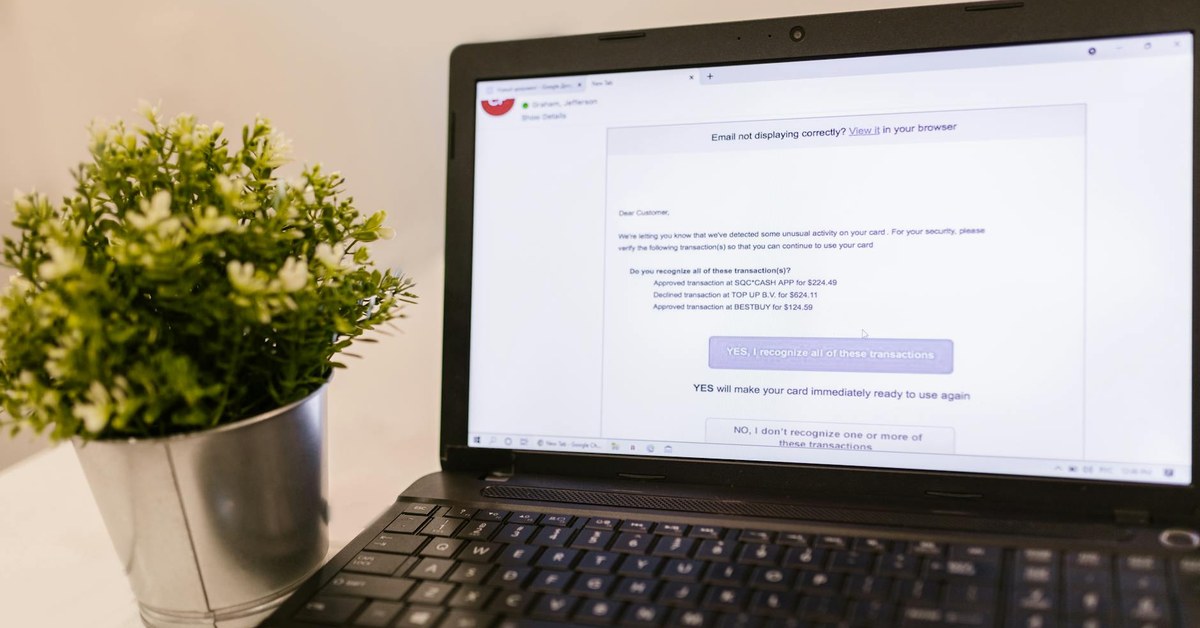
Phishing emails almost always create artificial time pressure. "Your account will be suspended in 24 hours." "Unusual activity detected; verify now." "You must confirm your identity today or lose access." This urgency is deliberate. Criminals know that when you feel panicked, you skip the careful checks you would normally make.
Legitimate organisations rarely threaten immediate consequences by email. Your bank will not close your account because you did not click a link within hours. If something genuinely needs your attention, you can always log in directly through the official website or ring the company's published phone number.
3. Generic greetings instead of your actual name
"Dear Customer," "Dear User," "Dear Account Holder." If a company you have an account with sends you a legitimate email, they will almost always use your name. Phishing emails are sent in bulk, so attackers often do not know your name and resort to vague greetings.
That said, more sophisticated phishing campaigns do use your real name, sometimes harvested from data breaches or social media. So a personalised greeting does not guarantee safety, but a generic one should raise your suspicion.
4. Links that do not go where they claim
This is where many people get caught. A phishing email might display text that reads "www.barclays.co.uk/security" but the actual hyperlink underneath points to a completely different website. On a computer, hover your mouse over any link without clicking it and look at the URL that appears in the bottom corner of your browser or email client.
On a mobile device, press and hold the link to preview the destination. Look carefully at the domain. Attackers use tricks like "barclays.co.uk.secure-login.com," where the real domain is "secure-login.com" and "barclays.co.uk" is just a subdomain they created.
5. Requests for sensitive information
No reputable bank, government agency, or service provider will ask you to send passwords, PINs, full card numbers, or National Insurance numbers by email. Full stop. If an email asks for this information, it is almost certainly a phishing attempt.
HMRC has been particularly clear on this point, repeatedly stating they will never ask for personal or financial information through email. The same applies to the NHS, your bank, and virtually every legitimate organisation.
6. Spelling and grammar mistakes
Traditional phishing emails were riddled with errors, and this remains a useful indicator. However, AI-generated phishing content in 2026 is significantly more polished than it was even two years ago. The NCSC has warned that large language models are making phishing emails more convincing and harder to distinguish from genuine communications.
Look for subtler issues instead. Inconsistent formatting, odd phrasing that does not match the company's usual tone, or British organisations using American spelling ("organization" instead of "organisation") can all be clues.
7. Unexpected attachments
If you receive an email with an attachment you were not expecting, treat it with extreme caution. Phishing attachments can contain malware that installs itself the moment you open the file. Common dangerous file types include .exe, .zip, .scr, and macro-enabled Office documents (.docm, .xlsm).
Even PDFs can be weaponised. If your bank supposedly sends you a statement you did not request, do not open the attachment. Instead, log into your banking portal directly to check.
8. Too good to be true offers
"You've won a £500 gift card!" "Claim your tax refund of £847.63." "You have been selected for a special government payment." These offers exploit our natural desire for good news. The specific pound amount in fake tax refund emails is a particularly clever trick; the precision makes it feel real.
If you were not expecting a refund, prize, or payment, approach with scepticism. Verify directly with the organisation through their official channels.
9. Mismatched or suspicious branding
Phishing emails often use stolen logos and brand colours, but the details are slightly off. The logo might be low resolution, the colour scheme slightly wrong, or the email layout different from what you usually receive from that company. Compare the suspicious email with a genuine one from the same organisation if you have one in your inbox.
Real-World Phishing Examples That Fooled Thousands
Understanding how to spot a phishing email is easier when you see how attacks work in practice. Here are three common scenarios based on real attack patterns reported in the UK.
The Royal Mail delivery scam
You receive a text or email claiming a parcel could not be delivered and you need to pay a small redelivery fee, typically £1.50 to £2.99. The link takes you to a convincing Royal Mail-branded page that asks for your full card details. The criminals are not after the small fee; they want your complete payment information to make much larger transactions later.
The giveaway: Royal Mail will leave a physical "Something For You" card if they cannot deliver. They do not email asking for payment through a link. Any redelivery fees are handled through their official website or app.
The HMRC tax refund email
An email arrives with HMRC branding telling you that you are owed a tax refund. It asks you to click a link and enter your bank details so the refund can be processed. These emails are extremely common around the end of the tax year in April.
The giveaway: HMRC will never notify you of a tax refund by email or text. Refunds are communicated through your Personal Tax Account or by post. Any email claiming to be from HMRC offering money is fraudulent.
The Microsoft 365 credential harvest
You receive an email that appears to come from your IT department or Microsoft, warning that your password is about to expire or that unusual sign-in activity has been detected. The link leads to a perfect replica of the Microsoft login page. Once you enter your credentials, the attackers have immediate access to your email, OneDrive, and potentially your entire organisation's systems.
The giveaway: Check the URL in the address bar of the login page. Microsoft login pages are hosted on "login.microsoftonline.com" or "login.live.com." Anything else is fraudulent. Also, legitimate password expiry notices from Microsoft 365 will direct you to change your password within the application itself, not through an emailed link.
Advanced Phishing Techniques to Watch For in 2026
Phishing is not standing still. Attackers are adopting new techniques that make traditional advice less effective on its own.
AI-generated phishing content
The NCSC's 2024 and 2025 threat assessments highlighted artificial intelligence as a significant enabler of more convincing phishing campaigns. AI tools can generate grammatically perfect, contextually appropriate emails that mimic a company's communication style almost flawlessly. The old advice to "look for bad grammar" is no longer sufficient as a primary defence.
Spear phishing and business email compromise
Unlike bulk phishing, spear phishing targets specific individuals using personal information gathered from LinkedIn, social media, or previous data breaches. You might receive an email that references your actual job title, a recent company event, or a colleague's name. Business email compromise (BEC) attacks cost organisations globally over £38 billion between 2019 and 2024 according to FBI data.
QR code phishing (quishing)
A growing trend involves emails containing QR codes instead of clickable links. Because most people scan QR codes with their phones, they bypass the desktop security tools that might otherwise flag a dangerous link. Always be cautious about scanning QR codes from unexpected emails.
Multi-channel phishing
Some sophisticated attacks combine email with phone calls or text messages. You might receive a phishing email, followed by a phone call from someone claiming to be from your bank's fraud department, referencing the email to build credibility. This layered approach is particularly effective because each contact appears to validate the others.
What to Do When You Spot a Phishing Email
Knowing how to spot a phishing email is only half the battle. Here is exactly what to do when you identify one.
Do not click, download, or reply
Resist the urge to click any links, open any attachments, or reply to the sender. Even replying to say "I know this is a scam" confirms to the attacker that your email address is active and monitored.
Report it
Forward the suspicious email to report@phishing.gov.uk, the NCSC's official reporting address. This directly helps protect others, as the NCSC uses these reports to identify and take down malicious websites. If the phishing attempt impersonates a specific company, forward it to their dedicated phishing reporting address as well. Most major banks and services have one.
Delete it
After reporting, delete the email from your inbox and your deleted items folder. There is no reason to keep it.
If you have already clicked or entered information
Do not panic, but act quickly. Change the password for the affected account immediately, and for any other accounts where you use the same password. Enable two-factor authentication if you have not already. Contact your bank immediately if you entered financial information. Report the incident to Action Fraud on 0300 123 2040 or through their website.
Building Long-Term Phishing Resilience
Spotting individual phishing emails is important, but building habits that protect you consistently is even more valuable.
Enable two-factor authentication everywhere
Two-factor authentication (2FA) means that even if an attacker captures your password through a phishing email, they still cannot access your account without the second verification step. Use an authenticator app rather than SMS where possible, as SIM-swapping attacks can intercept text messages. This single step dramatically reduces your risk.
Use a password manager
Password managers offer a hidden anti-phishing benefit that many people overlook. Because they fill in your credentials based on the website's actual URL, they will not auto-fill your password on a phishing site that merely looks like the real thing. If your password manager does not offer to fill in your details on a login page, that is a strong signal something is wrong.
Keep software updated
Security updates patch vulnerabilities that phishing attacks exploit. Set your operating system, browser, and email client to update automatically. This is one of the simplest and most effective security measures available.
Verify through separate channels
Make it a habit to verify unexpected requests through a completely separate communication channel. If you receive an email from your bank about suspicious activity, do not use any contact details in that email. Instead, call the number on the back of your bank card or type the bank's web address directly into your browser. This simple practice defeats even sophisticated phishing attempts.
Teaching Others How to Spot Phishing Emails
If you have family members who are less confident with technology, sharing this knowledge could protect them from serious harm. Older adults are disproportionately targeted by phishing scams, and Age UK reports that victims often experience significant emotional distress beyond the financial loss.
Practical tips for helping others
Show, do not just tell. Sit with your family member and walk through a real phishing email together, pointing out the red flags. Help them set up their email client to display the full sender address by default. Write down the steps for checking a suspicious email and keep the note near their computer. Encourage them to ring you before clicking anything they are unsure about.
For younger people, the fundamentals are the same, but the attack vectors may differ. Children and teenagers are more likely to encounter phishing through gaming platforms, social media direct messages, and messaging apps rather than traditional email.
The Bottom Line
Phishing will continue to evolve, but the core principles of spotting it remain remarkably stable. Check the sender's address. Question any urgency. Hover before you click. Verify through official channels. These habits take seconds but can save you from devastating consequences.
Learning how to spot a phishing email is not about becoming paranoid. It is about becoming observant. The more you practise these checks, the more automatic they become, until examining an email critically is as natural as looking both ways before crossing the road. That level of awareness is something no cybercriminal can easily defeat.